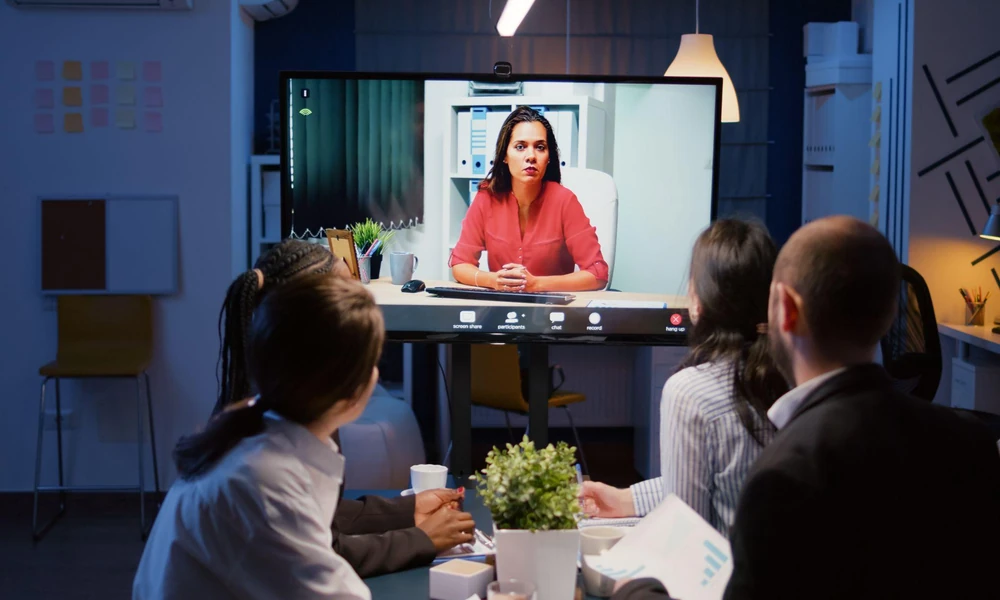
Image Recommendation: A hybrid meeting room mid-video-call, screen visible with a remote participant, window shade partially lowered behind the in-room speaker.
Has anyone in a meeting room ever looked washed out on a video call while the room itself looked perfectly fine to everyone sitting in it? That’s usually not a camera problem. It’s a window problem that only shows up the moment a camera, rather than a human eye, is the thing doing the looking.
Why a Camera Sees a Window Differently Than a Person Does
A person sitting in a room automatically adjusts to a bright window behind someone; the eye compensates, and the face still reads fine. A webcam doesn’t do that nearly as well. Strong backlight from an uncovered or poorly shaded window tends to push a camera’s exposure toward the brightest point in frame, which leaves the person speaking underexposed and hard to read, exactly the kind of detail office window shades guides rarely mention, since most were written before hybrid meetings became a daily fixture rather than an occasional dial-in.
The Spec That Looked Fine on a Site Visit, Then Failed on Camera
A shade chosen during a daytime walkthrough can look entirely reasonable to the people standing in the room and still perform badly on a call an hour later, once the sun has shifted and the backlight angle changes. Light-filtering fabrics that read as a soft, pleasant glow in person often translate on camera as a flat, blown-out wall of brightness behind the speaker. The gap between how a room looks and how it films is the part that tends to get discovered only after the complaints start, usually from whoever’s sitting furthest from the window during a client call.
What Meeting Rooms Actually Need From a Shade
- Blackout or near-blackout capability for rooms that run frequent video calls, not just light diffusion.
- Shades that can be lowered fully without someone needing to guess the right partial position each time.
- Consistent coverage across all windows in the same room, so backlight doesn’t vary panel to panel.
Where a Curtain Shop in Singapore Fits Into an AV-First Brief
Rooms used for presentations or projector-based meetings have a second requirement shades alone don’t always solve: full blackout for screen visibility, which is a different performance standard than simply cutting glare off a laptop. This is why a curtain shop in Singapore increasingly fields enquiries for layered setups in AV-heavy rooms, a blackout curtain paired behind an everyday blind, so a room can run as a normal office space most of the day and switch to full blackout in minutes when a presentation or an important call calls for it.
One Thing Most Office Window Specs Miss
- A room can look glare-free to the eye and still backlight badly on camera.
- Testing a shade with a laptop camera on, not just a walkthrough, catches this before a client call does.
- The fix is usually full blackout capability, not a slightly better light-filtering fabric.
A Quick Way to Test a Room Before Committing to a Shade
Sitting in the seat closest to the window with a laptop camera on, at the time of day most calls actually happen, tends to reveal more than any fabric sample ever will. If the face on screen looks dim or washed out with the shade in its normal daytime position, that’s the position that needs fixing, not the person’s lighting setup or the camera’s settings. It’s a five-minute test most fit-outs skip entirely, mostly because nobody thinks to run it until after the room is already built and the first awkward call has already happened.
Keeping It Consistent Across Floors, Not Just One Room
A company with several meeting rooms across one or more floors tends to run into a second version of this problem once the first room’s shade gets fixed: each room was often specified separately, sometimes years apart, which means backlight performance can vary noticeably from one meeting room to the next even though they look identical to a visitor walking past. A visiting client who gets a crisp, well-lit call in one room and a dim, backlit one in another notices that inconsistency more than either room’s décor, and it reflects on how put-together the company looks on camera rather than just how a single room performs.
A room built for how it looks to a visitor walking through it isn’t automatically built for how it reads on a screen to someone dialling in from elsewhere, and hybrid meetings have made that second audience just as frequent as the first.
Figuring out which rooms need full blackout versus which just need better light control is easiest with an on-site look rather than a guess. Contact De Art Studio to have that assessed.